The solution is as follows:
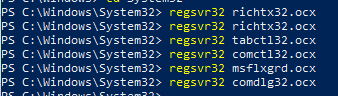
- Windows key + X and select “Windows PowerShell (admin)”;
- Type the following commands and re-start SRIM installation:
Published by Matheus A. Tunes
An experimental physicist who enjoys the company of intriguing people and is able to endure many cups of coffee and engage in endless scientific discussions.
View all posts by Matheus A. Tunes


 Materials at Extremes